Subscribe For Free Updates!

We'll not spam mate! We promise.

Thursday, 3 April 2014

The Nokia Lumia 930


The 2.2GHz quad-core Lumia 930, announced in the first week of April 2014 at Microsoft’s Build conference, is basically the rest-of-world version of the Lumia Icon Verizon exclusive, which launched in the U.S. back in February. The 930 will come with the Windows Phone 8.1 update out of the box, though — so it’s not launching til late June or early July in the U.K.
It is also, it conceded, down to its “launch campaign plan” — ergo, the pair want to make sure all those joint Nokia-Microsoft marketing pounds do they job they’re intended to. The joint marketing campaign for the 930 will be “one of the biggest ever”, they said today.
U.K. pricing has not been announced as yet (Microsoft out a $599 price-tag on the phone yesterday), but Nokia is describing it as its new flagship Lumia so expect a premium price.
Although it’s clearly a high end handset, the phone has the more standard 20MP Carl Zeiss lens on the back, rather than the 41MP PureView beast found on the Lumia 1020. Clearly that bigger but bulkier PureView lens is going to remain siloed in the Lumia portfolio for the foreseeable future, as a specialist bit of kit for photography enthusiasts, rather than a technology that gets pushed across all high end Lumias


Design
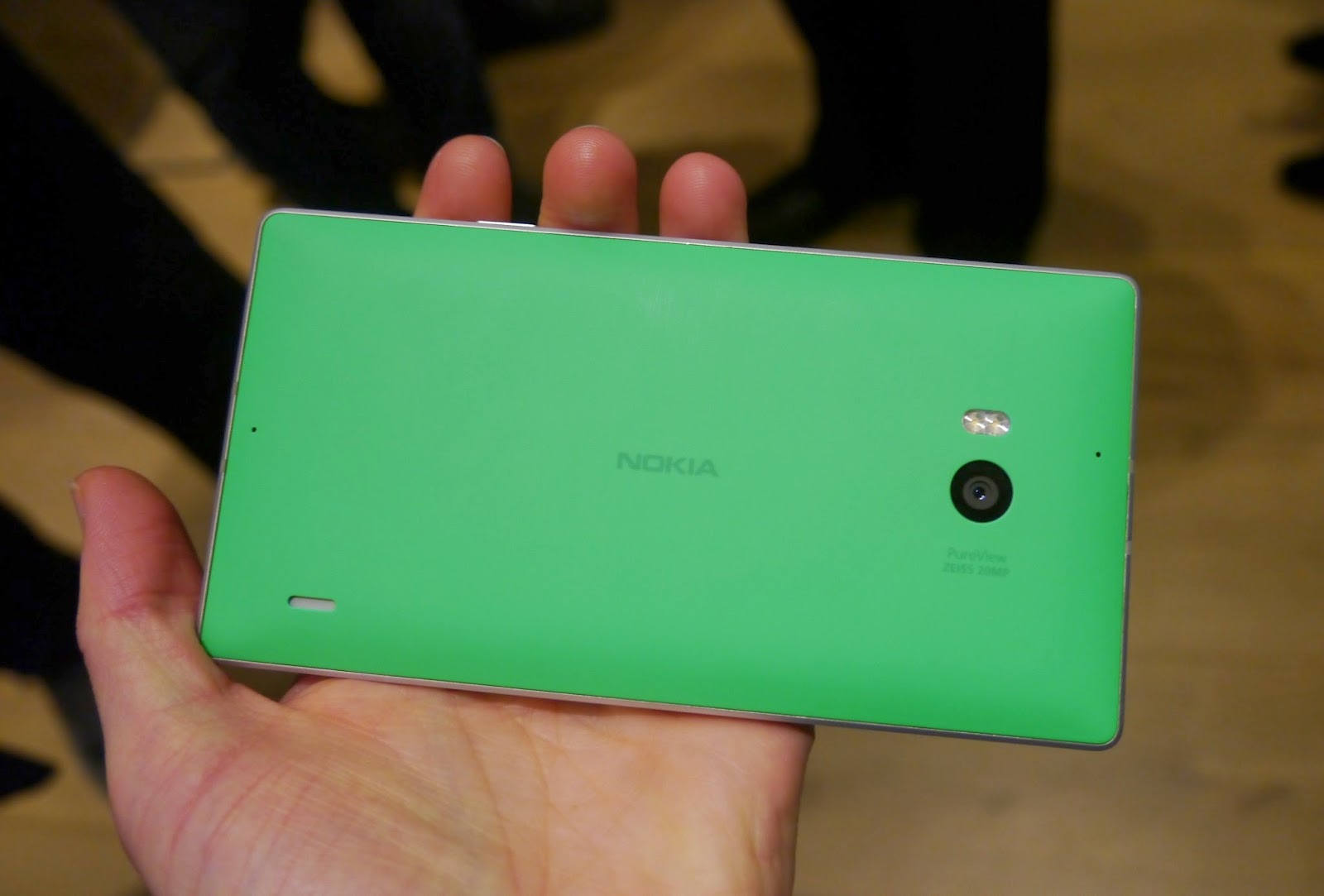
The Lumia 930 has an aluminum unibody design, giving it a solid, premium feel, softened by a plastic rump that comes in a range of vivid colours — including bright orange and the bright green variant pictured below (the green is considerably brighter than it appears in the photo).
There are more muted colour options available too (such as white and black) for those who prefer not to add a high-via jacket to their handset.
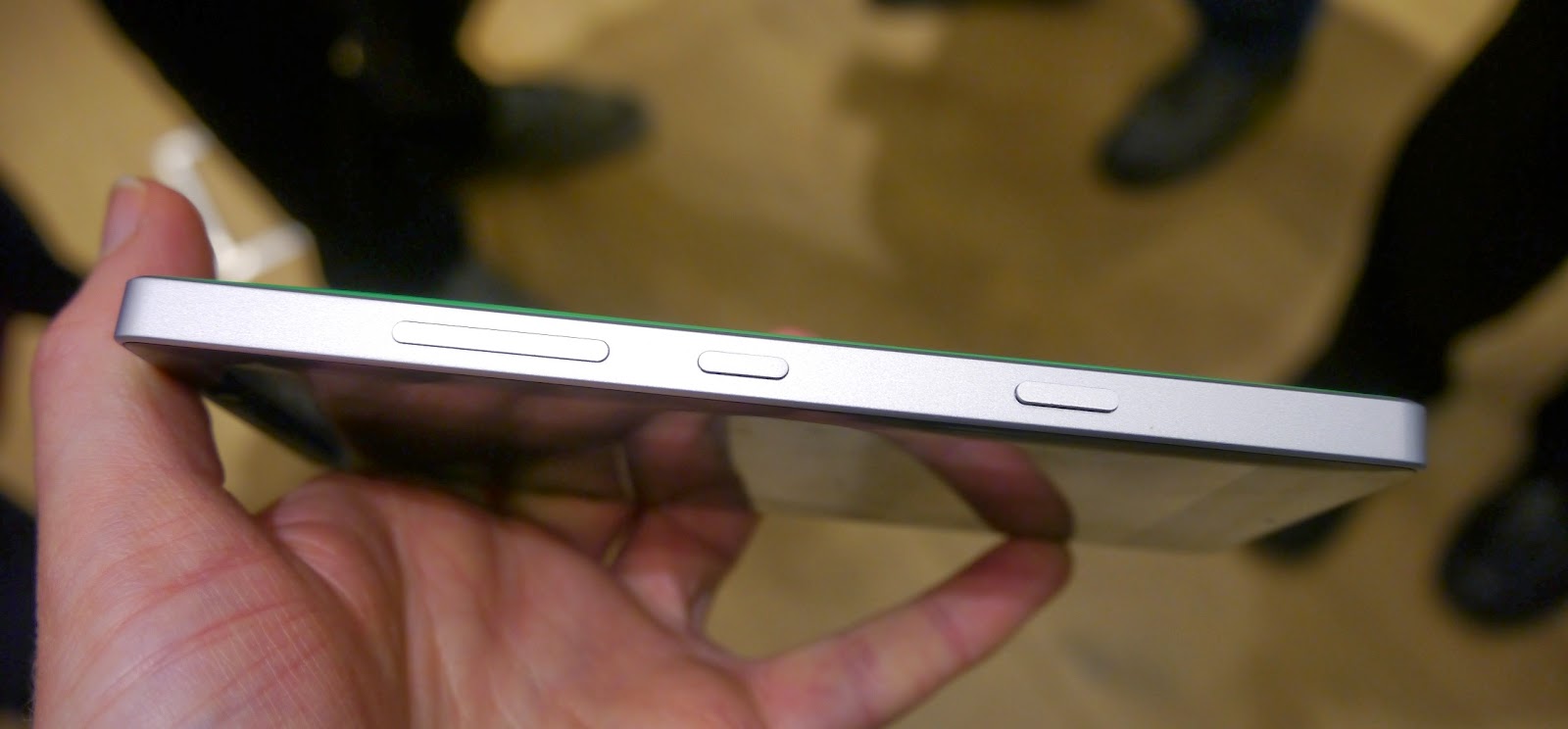
 The overall size of the Lumia 930 is pleasing, with a generous but not ridiculous 5-inch display, and blunt metal sides that are nice and easy to grip. The weight in the hand is not notably hefty – a problem Nokia had with early flagships, but which it’s since managed to kick into touch.


The Lumia 930 screen is pure eye-candy, with curved Gorilla Glass and clear, bright colours on a full HD OLED display.
Details looked crisp during my brief hands on, and while saturation levels are a little on the vivid side — especially when compared to Sony’s Xperia line of smartphones which opt for an  intentionally more realistically toned look – they are not pushing too far in garish directions, as can be the case with some Android handsets.
Windows Phone 8.1
Many of the extras coming with Windows 8.1/WP 8.1 focus on Microsoft burnishing its three-screen strategy — so you can unify your usage of Windows devices across the PC, Xbox-controlled living room TV and smartphone.
So, for instance, content such as your photos are automatically synced across all devices, via Microsoft’s OneDrive cloud storage, and you can start watching a movie on one device, pause it, then pick up your viewing on a different Windows device. You can even turn your phone or tablet into a remote control for your Xbox — by using a SmartGlass mode.

Another feature allows for Wi-Fi login details to be synced across devices, so you don’t have to re-enter passwords on all devices. And you can choose to opt have the same look and feel on your start screen across all your devices, should you prefer.
If you’re not fully signed up to the Microsoft ecosystem, with multiple Windows-branded devices already in your possession, none of that is not going to be too exciting but Microsoft is clearly hoping to make its environment increasingly compelling and convince people with one or two of its devices to get the full set, pull up a chair and stay a while.
Elsewhere, the Windows Phone 8.1 update adds a Swype-style text input system to the keyboard — which Microsoft is calling Word Flow. This is a nice addition which plays catch up with Android and gets one over on iOS — as the latter continues to preserve its keyboard software in digital aspic. Hopefully Word Flow will be the tiny cut that finally spurs Apple to keyboard innovation action.
The Word Flow system includes next word prediction that learns as you use it in order to surface more relevant language. Microsoft is claiming its keyboard software is the fastest in town. But really that sort of thing is down to user preference and typing style. Still, it’s great to see another input method on tap for Windows Phone users.
Another new software flagship is Cortana — a digital personal assistant (aka Microsoft’s Siri) that learns about you by taking a cross-section of your usage, via your Microsoft account, so it can pull threads on your web usage, email, apps, the people you interact with, and so on.
Cortana was not working on the version of the device Nokia was showing at today’s briefing so there was no chance to kick the tires there. It also won’t be available in the U.K. until later in the year — with its initial launch being in the U.S. Whether it lives up to the big promises and ends up being more useful at prompts and recommendations than Google Now remains to be seen.

The 8.1 update also brings support for Bluetooth 4.0 — a very welcome addition, as it will allow developers who are building interesting hardware add-ons for smartphones to choose to support Windows Phone, not just iOS and Android – and there’s support for Miracast, so you can stream content from the Lumia 930 to a TV.


Additional 8.1 updates focus on tweaks that users had apparently requested, such as a new notifications screen that Microsoft calls Action Center. This is brought on screen by swiping down from the top of the device — as with Android or iOS — and displays a list of alerts, such as new emails or phone calls, along with configurable short-cut buttons so you can quickly toggle on/off Wi-Fi, or Bluetooth, or flight mode. And so on.Likewise another user-requested feature is the ability to add a photo as a homescreen background — rather than having to stick with only configuring the solid colour of your homescreen Live Tiles. Microsoft’s compromise here to implement what users want (i.e. background photos) within its Live Tile framework is to have the photo appear behind the tiles, with the tiles themselves overlaid over the picture.


Another 8.1 update extends the default Bing search function so it’s no longer just a web search, but also trawls the device for related content and organises results into handy silos like ‘images’ and ‘videos’. Microsoft said it will also foreground apps in this search — as a way to push more users to download developers’ wares.

Other software updates coming to the Lumia 930 include tweaks to Nokia’s Creative Studio photo editing software, with five new filters and features such as non-destructive editing.
The Lumia 930′s camera editing tools offer users some powerful controls for users to manipulate their imagery but the interface can be rather cluttered with options, as a result.
Outlook
Microsoft is gradually getting its services-centric focus and three-screen act together — and building in the syncing links across its OSes make that sort of unification worth the buy in, pouring effort into cloud services such as OneDrive, SharePoint and OneNote. Lumia 930 users get up to 10GB of free storage on OneDrive — if they turn on auto photo syncing — which gives them another incentive to stick with Microsoft-branded services. Albeit Redmond is catching up/competing with third party alternatives, here, such as Dropbox — which are frequently bundled with Android handsets. Apple’s iCloud offers 5GB free storage so Microsoft is at least doubling down to make its services offering stand out from iOS.


For Redmond’s three-screen offering to genuinely excite users, it’s going to need it to be rock solid reliable — and unfortunately that was not the case in this morning’s tech demos. Polishing out the sort of syncing problems on show is going to be essential in future, if users’ are to be convinced of the benefits of locking themselves into a Microsoft ecosystem. This stuff really must ‘just work’. So there looks to be some more work for Microsoft to do there.
It’s also notable that a lot of the tweaks to Windows Phone 8.1 add in features that users have likely got used to via competing platforms — such as a swipe-down notifications menu, or the ability to customise the look and feel of a device by choosing their own background photo. On the one hand Microsoft caving to add such features to Windows Phone is a concession that it’s failed to convince people to fully adopt its alternative to the mainstream — i.e. Live Tiles for notifications and personalisation. However, responsiveness to user feedback is most definitely a strength — and something that hasn’t always been associated with a Microsoft modus operandi. Ultimately, listening to users and giving them things they are hankering for is far more important than trying to retain something different just for the sake of it.
source:www.techcrunch.com

Wednesday, 2 April 2014

10 Hidden But Amazing Features Of Facebook


10 .View Photos in a classic way


If you don’t like the pop up black box appearance of the photos, you can simply revert to get a classic view of your photographs by pressing F5 on your keyboard. With this you can flick through your album photos rather than clicking on each photo separately.


9 .Create an interest list


Based on your interests you can make use of the option for creating an interest list. You can either follow other people’s list or else you can make an interest list. For example you can make a list of “Must Visit Non Popular Places” in India.


For creating an interest list Visit https://www.facebook.com/bookmarks/interests and click the 'Add Interests' button. Then click 'Create List' and search for the people or Pages you want to add to your list, or browse the categories towards the left. After selecting the things you want include, decide a name for your list and select a privacy setting .Choose ‘Public’ if you want others to subscribe to your list. In case if you are following a list then you can see the updates from the list by clicking the topright of your homepage.


8.View Friendship History


This feature can be used to brush up your old memories. If you want to look at the Facebook interactions that you’ve had with a particular friend, go to their profile page, clicking the arrow in the top right corner and select ‘See Friendship” from the dropdown menu. In case if you have added a relationship to your timeline  with the friend  you are searching  then go to https://www.facebook.com/us to see the friendship page for you and your friend. For getting the friendship page for two of your friends you just go to a friendship page, and then click 'More' and type the names of your  friends.


7. Check your other Messages


Facebook highlights some stories in your news feed that is relevant to you according to the information it carries. Similar way it also sorts out the messages. The main inbox carries messages from your friends and their friends. All other messages go to other folder from where you can access them separately. Facebook doesn’t send a notification when a new message arrives here, thus there will be a lot of unread messages piled up in the other box.


6 .Prevent tagged posts from automatically displaying on your Timeline


Facebook has a wonderful option of dismissing or approving the tags that people add to your post. If you turn it on then when someone tags a photo or post you made, then the tag won’t appear until you approve it.


To turn on tag review, click on the arrow at the top right of any Facebook page and select 'Settings' in the left-hand column. Then click Timeline and Tagging and look for the setting 'Who can add things to my timeline?' and click 'Edit' next to the option 'Review posts friends tag you in before they appear on your timeline' to turn this on. This will but only controls the things that will appear on the timeline, posts you are tagged in still appear in the search, newsfeed and other options.


5. Turn your profile upside down


In the language feature of Facebook there is option to turn all the words on it upside down. Even if you select the option, it’s something that you can only see, not your friends. To activate this option you first have to go to your Facebook profile "Settings", and then click on the "Language" tab. From the language drop down box choose "English (Upside Down)".


4 .Download your Facebook data


In the Facebook general account settings there is a useful and interesting feature that allows you to download all the information available in your account like posts, photos, messages. To add up it can also save various other information that cannot be accessed by a simple logging like the ads you have clicked on, data like the IP addresses that you were on when you logged into or out of Facebook, and many other such things.


3. Send a private message from a traditional email account


You can send a message from your traditional mail like Gmail or Yahoo to one’s Facebook account. The general format for this is username@Facebook.com. The messages will be delivered to your Facebook folder. When you send messages to external mail address they will look similar to Facebook messages with your name and profile picture.


2. Activity log


Activity log helps you to do a review on your activities in the Facebook like the details on the photo shared by you, when you added a particular person as friend. It is record of all your posts and activities from the very time you opened your account. Get to your activity log by clicking the arrow at the top right of any Facebook page and choosing Settings, followed by 'Privacy'. Next to 'Who can see my stuff?' click 'Use Activity Log'. This feature you can also use to review the photos you shared, posted and hidden on timeline.


1. Turn off Mobile push Notifications


 Getting regular Facebook updates on your mobile phone can be irritating. Push notifications can be set on and off from the phone or your Facebook apps. To make alterations in the mobile puff notifications go the privacy settings, then notifications, mobile push and un-tick the things that you don’t need notifications about. Nowadays it’s not possible to change the push notifications from mobile browsers or via feature phones.

Facebook To Deliver Internet From The Sky!

CALIFORNIA: As the popular social networking site Facebook goes on an acquisition spree, its founder Mark Zuckerberg now has plans to make it more sci-fi in the near future.


In the latest post, he has revealed that drones, satellites and lasers are being developed at Facebook's connectivity lab to deliver the internet to "the next 3 billion people" in underdeveloped countries.


"For suburban areas in limited geographical regions, we have been working on solar-powered high altitude, long endurance aircraft that can stay aloft for months, be quickly deployed and deliver reliable internet connections," Zuckerberg announced.


“For lower density areas, low-earth orbit and geosynchronous satellites can beam internet access to the ground," he added.


According to him, in their effort to connect the whole world with Internet.org, they have been working on ways to beam internet to people from the sky.


He admitted that new technology was the key to expanding the internet's reach.


"Our team has many of the world's leading experts in aerospace and communications technology, including from NASA's Jet Propulsion Lab and Ames Research Center," the post revealed.


After buying popular mobile messaging service WhatsApp for $19 billion, Facebook is set to purchase Oculus VR, the virtual-reality-headset company best known for its Oculus Rift gaming device, for $2 billion.


Facebook is also reported to buy Texas-based Titan Aerospace that makes drones that can fly solo for five years without needing to land for $60million

Nokia 3310 returns with 41-megapixel camera upgrade


Just when one thought that Nokia will launch even more products in its Nokia X family running Android or new Lumia devices based on Windows Phone 8.1, April Fools' Day comes and Nokia announces its heritage 3310 in a new avatar.

The Nokia 3310, which was initially launched in 2000 and is one of the most successful phones ever released by Nokia, has made a modern-day comeback.

The Finnish giant has introduced its 3310 sporting a 41-megapixel PureView sensor with Zeiss optics and Xenon flash. Further, the 3310 is seen boasting a huge camera hump at the back panel, much like Nokia 808 PureView and Nokia Lumia 1020.

The company claims that the Nokia 3310 now runs a modified version of Windows 8 (yes, you heard it right) with a new 'ClearDiamond' 3-inch WXGA (768x1280) display.
The Nokia 3310 PureView will be available in Blue, Dark Blue, Green, Red and Yellow colour variants.

The revamped Nokia 3310 is a touchscreen device and also sports three soft-touch navigation buttons, alongside a Windows Phone 'home' button.

Other specifications of the Nokia 3310 include a 1.5GHz dual-core processor; 2GB of RAM; 1430mAh battery; 32GB inbuilt storage; Bluetooth 4.0; Wi-Fi and 3G.
The yesteryear device Nokia 3310 comes with pre-loaded with four games - Snake II, Pairs II, Space Impact and Bantumi. Other pre-installed apps include MS Office, Xbox Games, Outlook and OneDrive.

Nokia notes that the Nokia 3310 will be rolled out with 3G connectivity, while LTE-enabled devices will follow later this year.

Commenting on the Juha Alakarhu, Nokia's Head of Imaging Technologies said, "I'm really excited that we've found a way to marry our innovative PureView technology with such a beloved device. With its durable design and iconic look, we think even more people will enjoy our signature PureView magic."

Celent ranks Infosys's core banking solution Finacle global market leader


US-based research and consulting firm Celent has ranked Infosys a global market leader for winning the highest number of deals in 2012-13 for its Finacle universal core banking solution. 

"Infosys's Finacle scored the highest in terms of number and aggregate value of deals won among 15 global vendors of core banking systems," the IT bellwether said in a statement on Wednesday. 

The Celent core platform sales report's ranking was based on a weighted score linked to a bank size, location and modules installed. 

"Our leadership ranking in Celent's 'Big League 2013' report testifies our global position as the number one core banking solution provider," Finacle global head M Haragopal said on the occasion. 

The global software major helps leading banks the world over to generate sustainable business growth with its flagship product's latest version. 


'"As banks strengthen their focus on accelerating innovation and fine tuning their business models, our new version (11E) brings advanced functionalities, increased componentization and enterprise-class capabilities to help them achieve their targets," Haragopal said. 

According to Celent's retail and business banking analyst Stephen Greer, Finacle has shown its ability to implement in any environment and with an array of financial institutions and small, medium and large banks. 

"Finacle's new version is a competitive product with configurability and flexibility through componentization. We are bullish about its potential next year too," Greer noted. 

Finacle registered strong growth in the Asia-Pacific region with 60% of deals and had significant growth in Western Europe, accounting for 40% of all deals in the region. 

"Finacle received the XCelent customer base award for its sales performance in Asia-Pacific and Western Europe," the statement added.

source:http://timesofindia.indiatimes.com/

Tuesday, 1 April 2014

Sony Xperia M update Android Jelly Bean 4.3 available now


So a good news to all the Sony Xperia M users. They can now update their phone to the Android 4.3 Jelly Bean. The build version of the phone after the update will be 15.4.A.0.23. Update always bring some new features. So let us have a look on them.
This new update will bring an updated camera interface to the user. This will bring in burst and better auto shooting modes in the camera. A battery STAMINA mode is introduced which will help the battery to long last. There is enhanced user interface, graphics and most important security features.

Surprisingly Sony`s multimedia apps are also updated. The apps include Walkman, Movies & Album. The update or the new firmware is available in Asia & Europe.

You can also check whether the update is available for your Sony Xperia M phone. You can do it from Settings > About phone > Software updates > System updates. You can also download the Android 4.3 firmware and update for Sony Xperia M using the Sony PC Companion.

iBall Andi 5T Cobalt 2 launched


Indian handset maker iBall has introduced a new large screen smartphone - Cobalt 2 with 5-inch HD display. The new iBall Cobalt 2 measures 8.9 mm thick and is powered by a quad-core 1.3 Ghz mobile processor. The Cobalt 2 smartphone runs Android 4.2 Jelly Bean and is upgradable to Android 4.4 KitKat update. The iBall Cobalt 2 will be sold in India at a best buy price of Rs 11,999.


New iBall Cobalt 2 features a 5-inch IPS LCD display with 720p HD resolution and made using the One-Glass Solution technology. This smartphone has been powered by a quad-core 1.3 Ghz mobile processor paired with 1 GB RAM to power the Android 4.2 Jelly Bean version. The smartphone is expected to get the Android 4.4 KitKat update in future.
Cobalt 2 features a 12 megapixel camera at the back with autofocus and LED Flash. There is a 2 megapixel front facing camera with video calling support. iBall has integrated interesting set of features in this smartphone such as flip to mute, smart answer and shake to answer gestures. The Cobalt 2 features 1750 mAh battery for longer run time.
Priced at Rs 11,999, the Andi 5T Cobalt 2 is set to compete with the likes of the Sony Xperia E1 and the Motorola Moto G.

Two new low cost smartphones from BSNL


BSNL, in partnership with Champion, has launched two low cost Android smartphones. The new handsets, BSNL Champion SM3512 and SM3513 3G will be available for Rs 3,225 and Rs 4,499 respectively, BSNL said in a press release.
Curiously, the SM3512 and SM3513 are listed for Rs 4,499 and Rs 5,499 respectively on the website of Champion India.

BSNL Champion SM3512 and SM3513 are identical in nature except that the former is a 2G only handset while the later one is a 3G handset
Both the phones are identical in nature except that the BSNL Champion SM3512 is a 2G only handset while the other one is a 3G handset. Both the phones have a 3.5 inch touchscreen, dual core processor, Android 4.2.2 (Jelly Bean) operating system, dual SIM slots, 32 GB expandable memory slot, FM with recording facility, WiFi, G-sensor, GPRSBluetooth, 1.3 megapixel front camera, 3 megapixel rear camera, and 1300 mAh battery.

Powered by Blogger.
Related Posts Plugin for WordPress, Blogger...